Tester builds 2.0.0 (1.2.0)

Quote from tweber on April 8, 2026, 5:48 pmThanks for the outstanding work on SimulIDE! I've been using and recommending it to students in some of my classes (on the parts that use microcontrollers).
I'm eager to tryout the new ESP32 experimental implementation. However, in the latest Linux version (R260407_Lin64), "Espressif" is not listed on the Microcontroller section under the "Components" tab. I also could not find it in the "libraries" tab.
Is it something I'm missing or is it not yet available in the Linux version? When I open devkitc_test.sim2, it shows everything except the devkit itself.
Link that I used to download: https://simulide.com/p/wp-content/uploads/shared-files/testers/200/SimulIDE_2-R260407_Lin64.tar.gz
Thanks!
Thanks for the outstanding work on SimulIDE! I've been using and recommending it to students in some of my classes (on the parts that use microcontrollers).
I'm eager to tryout the new ESP32 experimental implementation. However, in the latest Linux version (R260407_Lin64), "Espressif" is not listed on the Microcontroller section under the "Components" tab. I also could not find it in the "libraries" tab.
Is it something I'm missing or is it not yet available in the Linux version? When I open devkitc_test.sim2, it shows everything except the devkit itself.
Link that I used to download: https://simulide.com/p/wp-content/uploads/shared-files/testers/200/SimulIDE_2-R260407_Lin64.tar.gz
Thanks!

Quote from arcachofo on April 9, 2026, 10:03 amMaybe you moved some files, for example taking the executable and moving to some bin folder or whatever.
If you leave files as they are then "Espressif" should be there.
Maybe you moved some files, for example taking the executable and moving to some bin folder or whatever.
If you leave files as they are then "Espressif" should be there.
Quote from tweber on April 9, 2026, 2:24 pmI could successfully see the Espressif modules, but only if I start the program from within the main application folder:
- if I am at the main simulide folder (where the executable is), calling "./simulide" or using the absolute path (in my case, "/opt/simulide/simulide") works perfectly, in the sense I'm able to see the Espressif modules;
- however, if I add the folder to $PATH and call it from anywhere else ("/home/user" for instance), the Espressif modules do not appear. Calling it directly using the absolute path also results the same.
My temporary workaround is to use a bash script to change the folder before executing simulide (and add it to $PATH)
#!/bin/bash
OLD_PWD="$PWD"
cd /opt/simulide

if [ "$#" -eq 0 ]
then    # user added no argument
        ./simulide
else    # user added argument (assuming it is the file to open)
        ./simulide "$OLD_PWD"/"$@"
fi
I could successfully see the Espressif modules, but only if I start the program from within the main application folder:
- if I am at the main simulide folder (where the executable is), calling "./simulide" or using the absolute path (in my case, "/opt/simulide/simulide") works perfectly, in the sense I'm able to see the Espressif modules;
- however, if I add the folder to $PATH and call it from anywhere else ("/home/user" for instance), the Espressif modules do not appear. Calling it directly using the absolute path also results the same.
My temporary workaround is to use a bash script to change the folder before executing simulide (and add it to $PATH)
#!/bin/bash
OLD_PWD="$PWD"
cd /opt/simulide

if [ "$#" -eq 0 ]
then    # user added no argument
        ./simulide
else    # user added argument (assuming it is the file to open)
        ./simulide "$OLD_PWD"/"$@"
fi
Quote from arcachofo on May 1, 2026, 10:22 amNew tester build for SimulIDE 2 available for download: https://simulide.com/p/testers/
Most important changes:
- Experimental Dark Theme.
- Mouse events for Scripts.
New tester build for SimulIDE 2 available for download: https://simulide.com/p/testers/
Most important changes:
- Experimental Dark Theme.
- Mouse events for Scripts.

Quote from ru5t on May 7, 2026, 9:31 amQuote from arcachofo on November 17, 2025, 9:25 amHi, nice to see MicroPython running here...
UART will be routed to the MCU Pins, like other MCUs. Same than TWI, I2C, etc.
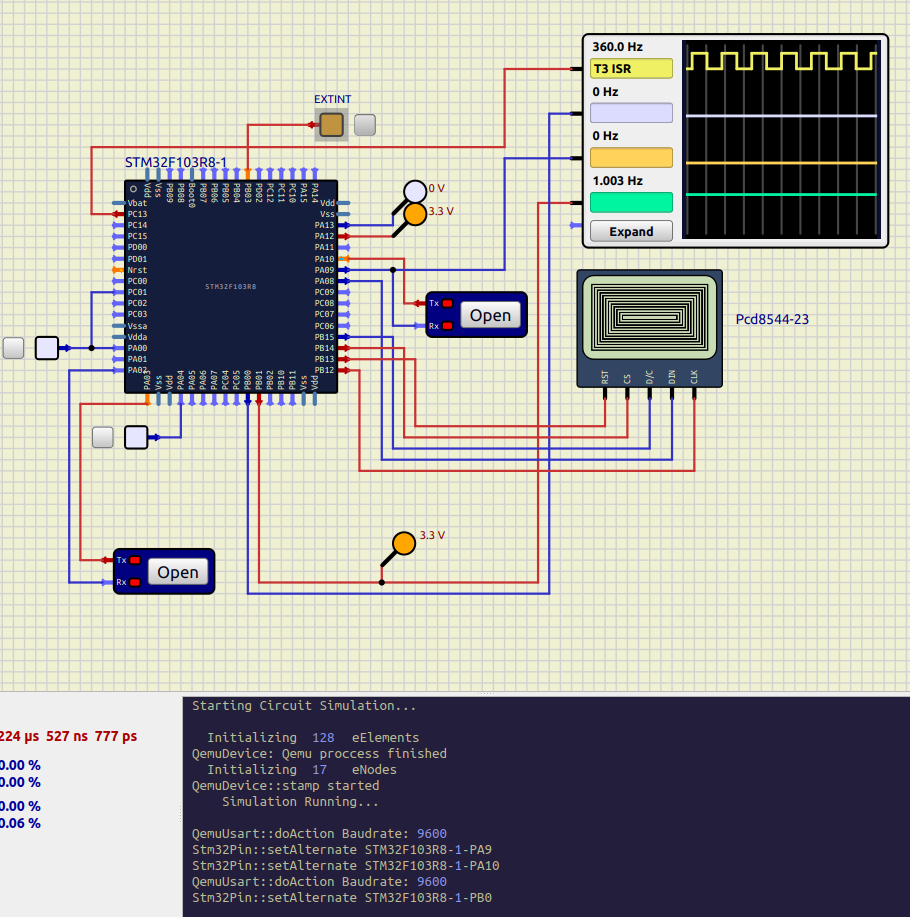
I have been working to implement Qemu STM32 inerface to SimulIDE, as it seems simpler to me than Esp32.
Now I'm taking a break because my brain hurts trying to understand Qemu, but I got most important peripherals more or less working. Still very raw but as a proof of concept is ok.
- GPIOs, with Remap and Pin change interrupts.
- Some Timers, with PWM, input capture, some Interrupts.
- UART, send and receive, some interrupts.
- TWI, send and receive.
- SPI, send and receive.
Esp32 was synchronized with SimulIDE only one way, SimulIDE could not send events to Qemu.
Now 2 way synchronization is implemented, which allow for Pin change Interrupts, Timer Input capture, UART receive, etc.
I still have to port these changes to Esp32, but the framework is more or less working.
About "devkitC":
You can edit SimulIDE_xxx/data/espressif/devkitC/devkitC.sim1 line 5 and change to mainComp="true".Now loading firmware and Serial Monitor by context menu is implemented like other MCUs.
Soon I will port changes to Esp32 and fix a bunch of minor issues...
Hi!
Can you please clarify how to get STM32 MCU component?
When downloading a tester build (2.0.0 / 260501) - there's a set of ESP32 related filles but none for STM32.
Quote from arcachofo on November 17, 2025, 9:25 amHi, nice to see MicroPython running here...
UART will be routed to the MCU Pins, like other MCUs. Same than TWI, I2C, etc.
I have been working to implement Qemu STM32 inerface to SimulIDE, as it seems simpler to me than Esp32.
Now I'm taking a break because my brain hurts trying to understand Qemu, but I got most important peripherals more or less working. Still very raw but as a proof of concept is ok.
- GPIOs, with Remap and Pin change interrupts.
- Some Timers, with PWM, input capture, some Interrupts.
- UART, send and receive, some interrupts.
- TWI, send and receive.
- SPI, send and receive.
Esp32 was synchronized with SimulIDE only one way, SimulIDE could not send events to Qemu.
Now 2 way synchronization is implemented, which allow for Pin change Interrupts, Timer Input capture, UART receive, etc.
I still have to port these changes to Esp32, but the framework is more or less working.
About "devkitC":
You can edit SimulIDE_xxx/data/espressif/devkitC/devkitC.sim1 line 5 and change to mainComp="true".Now loading firmware and Serial Monitor by context menu is implemented like other MCUs.
Soon I will port changes to Esp32 and fix a bunch of minor issues...
Hi!
Can you please clarify how to get STM32 MCU component?
When downloading a tester build (2.0.0 / 260501) - there's a set of ESP32 related filles but none for STM32.
Quote from arcachofo on May 8, 2026, 11:03 amHi!
Can you please clarify how to get STM32 MCU component?
When downloading a tester build (2.0.0 / 260501) - there's a set of ESP32 related filles but none for STM32.
Hi. STM32 is not yet ready.
After the post you quoted, I had to refactor the framework again, because it was not working very well for some ESP32 peripherals.
Now it is time for STM32 to catch up.
Hi!
Can you please clarify how to get STM32 MCU component?
When downloading a tester build (2.0.0 / 260501) - there's a set of ESP32 related filles but none for STM32.
Hi. STM32 is not yet ready.
After the post you quoted, I had to refactor the framework again, because it was not working very well for some ESP32 peripherals.
Now it is time for STM32 to catch up.
Quote from ru5t on May 10, 2026, 5:56 pmQuote from arcachofo on May 8, 2026, 11:03 amHi!
Can you please clarify how to get STM32 MCU component?
When downloading a tester build (2.0.0 / 260501) - there's a set of ESP32 related filles but none for STM32.
Hi. STM32 is not yet ready.
After the post you quoted, I had to refactor the framework again, because it was not working very well for some ESP32 peripherals.
Now it is time for STM32 to catch up.Got it! Thank you anyways!
Quote from arcachofo on May 8, 2026, 11:03 amHi!
Can you please clarify how to get STM32 MCU component?
When downloading a tester build (2.0.0 / 260501) - there's a set of ESP32 related filles but none for STM32.
Hi. STM32 is not yet ready.
After the post you quoted, I had to refactor the framework again, because it was not working very well for some ESP32 peripherals.
Now it is time for STM32 to catch up.
Got it! Thank you anyways!
Quote from Luther_alreim on August 18, 2026, 4:06 amQuote from arcachofo on November 27, 2024, 11:34 amHere are some templates for people that want to create scripts using communication modules (SPI, TWI, UART, TCP):
How can I download the templates? Clicking on them doesn't let me download them.
Quote from arcachofo on November 27, 2024, 11:34 amHere are some templates for people that want to create scripts using communication modules (SPI, TWI, UART, TCP):
How can I download the templates? Clicking on them doesn't let me download them.
Quote from arcachofo on August 21, 2026, 1:40 pmHow can I download the templates? Clicking on them doesn't let me download them.
Try this one: script_templates.zip
How can I download the templates? Clicking on them doesn't let me download them.
Try this one: script_templates.zip