
Simulide 2.0.0

Quote from feri on December 14, 2025, 10:41 pmCompiling error:
/home/feri/Qt_Projects/SimulIDE-dev-master/src/microsim/cores/qemu/esp32/esp32usart.h:27: error: ‘void Esp32Usart::connected(bool)’ marked ‘override’, but does not override
In file included from ../src/microsim/cores/qemu/esp32/esp32usart.cpp:8:
../src/microsim/cores/qemu/esp32/esp32usart.h:27:14: error: ‘void Esp32Usart::connected(bool)’ marked ‘override’, but does not override
27 | void connected( bool c ) override;
| ^~~~~~~~~
/home/feri/Qt_Projects/SimulIDE-dev-master/src/microsim/cores/qemu/esp32/esp32usart.cpp:77: error: ‘QEMU_USART_SENT’ was not declared in this scope; did you mean ‘QEMU_USART_RECEIVE’?
../src/microsim/cores/qemu/esp32/esp32usart.cpp: In member function ‘virtual void Esp32Usart::frameSent(uint8_t)’:
../src/microsim/cores/qemu/esp32/esp32usart.cpp:77:23: error: ‘QEMU_USART_SENT’ was not declared in this scope; did you mean ‘QEMU_USART_RECEIVE’?
77 | m_arena->mask8 = QEMU_USART_SENT;
| ^~~~~~~~~~~~~~~
| QEMU_USART_RECEIVE
:-1: error: [Makefile:12140: build/objects/esp32usart.o] Error 1
Compiling error:
/home/feri/Qt_Projects/SimulIDE-dev-master/src/microsim/cores/qemu/esp32/esp32usart.h:27: error: ‘void Esp32Usart::connected(bool)’ marked ‘override’, but does not override
In file included from ../src/microsim/cores/qemu/esp32/esp32usart.cpp:8:
../src/microsim/cores/qemu/esp32/esp32usart.h:27:14: error: ‘void Esp32Usart::connected(bool)’ marked ‘override’, but does not override
27 | void connected( bool c ) override;
| ^~~~~~~~~
/home/feri/Qt_Projects/SimulIDE-dev-master/src/microsim/cores/qemu/esp32/esp32usart.cpp:77: error: ‘QEMU_USART_SENT’ was not declared in this scope; did you mean ‘QEMU_USART_RECEIVE’?
../src/microsim/cores/qemu/esp32/esp32usart.cpp: In member function ‘virtual void Esp32Usart::frameSent(uint8_t)’:
../src/microsim/cores/qemu/esp32/esp32usart.cpp:77:23: error: ‘QEMU_USART_SENT’ was not declared in this scope; did you mean ‘QEMU_USART_RECEIVE’?
77 | m_arena->mask8 = QEMU_USART_SENT;
| ^~~~~~~~~~~~~~~
| QEMU_USART_RECEIVE
:-1: error: [Makefile:12140: build/objects/esp32usart.o] Error 1
Quote from feri on December 16, 2025, 7:10 pmNow it compiles, but the side menu for adding Arduino, AVR, Pic, etc. doesn't work.
Regards
Now it compiles, but the side menu for adding Arduino, AVR, Pic, etc. doesn't work.
Regards

Quote from arcachofo on December 16, 2025, 7:32 pmQuote from feri on December 16, 2025, 7:10 pmNow it compiles, but the side menu for adding Arduino, AVR, Pic, etc. doesn't work.
Regards
How doesn't work? What happens?
Quote from feri on December 16, 2025, 7:10 pmNow it compiles, but the side menu for adding Arduino, AVR, Pic, etc. doesn't work.
Regards
How doesn't work? What happens?
Quote from feri on December 16, 2025, 10:08 pmWhen I start SimulIDE the items Arduino - Avr - Etc.. do not appear in the menu, by right-clicking and selecting "manage component" I put the check mark on Arduino - Avr and also the other items under "Micro" the items appear in the menu but the Avr - Pic - Msc65 - Shields menus do not expand and the others I51 - Z80 - STM32 - Espressif do not drag into the diagram the pointer becomes a hand with a crossed out circle.
Quote from arcachofo on December 16, 2025, 10:26 pmHave you installed those components?
Now you can use the second tab to install and update components:
Have you installed those components?
Now you can use the second tab to install and update components:
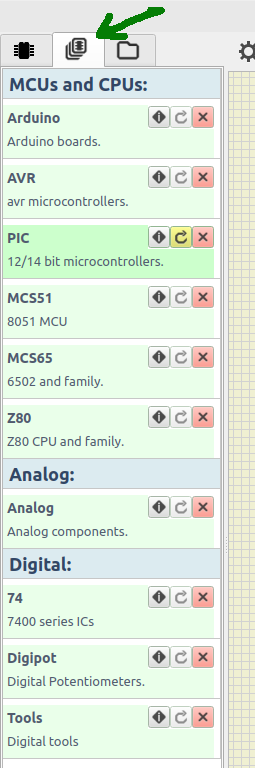
Quote from feri on December 17, 2025, 7:30 pmI copied the "Converted_from_1.1.0" directory to the simulide directory and set it as the "User data folder" but I can't install the components.
I copied the "Converted_from_1.1.0" directory to the simulide directory and set it as the "User data folder" but I can't install the components.
Quote from arcachofo on December 17, 2025, 7:32 pmI copied the "Converted_from_1.1.0" directory to the simulide directory and set it as the "User data folder"
Don't use those components. just install what you want from the second tab.
I copied the "Converted_from_1.1.0" directory to the simulide directory and set it as the "User data folder"
Don't use those components. just install what you want from the second tab.
Quote from arcachofo on December 17, 2025, 9:35 pmQuote from feri on December 17, 2025, 9:07 pmThe installer doesn't work, I click the button and nothing happens.
Not sure which button are you clicking.
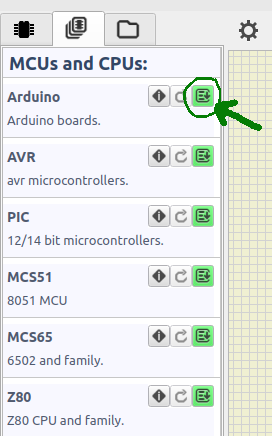
Install button is the one at the right side.
I found that the first time it is empty (I just fixed it) but anyway it works:
Quote from feri on December 17, 2025, 9:07 pmThe installer doesn't work, I click the button and nothing happens.
Not sure which button are you clicking.
Install button is the one at the right side.
I found that the first time it is empty (I just fixed it) but anyway it works:
Quote from feri on December 17, 2025, 11:25 pmIt works now, but only Arduino UNO can be inserted. For example, Arduino MEGA gives the following error:
"Chip::getPackages" Error: Cannot read file "/home/feri/.local/share/simulide/components/Arduino/arduino/Uno/Mega/Mega.sim1" "No such file or directory" "SubCircuit::loadSubCircuit" Error: Cannot read file "/home/feri/.local/share/simulide/components/Arduino/arduino/Uno/Mega/Mega.sim1" "No such file or directory" SubCircuit::construct: No Packages found for "Mega".
Regards
It works now, but only Arduino UNO can be inserted. For example, Arduino MEGA gives the following error:
"Chip::getPackages" Error: Cannot read file "/home/feri/.local/share/simulide/components/Arduino/arduino/Uno/Mega/Mega.sim1" "No such file or directory" "SubCircuit::loadSubCircuit" Error: Cannot read file "/home/feri/.local/share/simulide/components/Arduino/arduino/Uno/Mega/Mega.sim1" "No such file or directory" SubCircuit::construct: No Packages found for "Mega".
Regards