
ssd1306

Quote from arcachofo on January 23, 2026, 1:58 pmHi there.
Yes, those commands are supported in the last tester build.
A0/A1 was introduced in this version to remove "Rotate" property.
As far as I can understand in the datasheet, when A1 is executed it mirrors the display vertically, but also depends on C0/C8.This can explain some of the issues with scroll, but without the code it is difficult to say.
Scroll also depends on the parameters used in commands 26/27/29/2A.If you share your code I can test.
Hi there.
Yes, those commands are supported in the last tester build.
A0/A1 was introduced in this version to remove "Rotate" property.
As far as I can understand in the datasheet, when A1 is executed it mirrors the display vertically, but also depends on C0/C8.
This can explain some of the issues with scroll, but without the code it is difficult to say.
Scroll also depends on the parameters used in commands 26/27/29/2A.
If you share your code I can test.

Quote from arS on January 24, 2026, 6:50 amHi,
Please find the attached zip file for the .sim1, .s and .hex files.
The display after cmd A1 is executed looks like the one on the right below.
Here are the features in the circuit:
- press '#' to start. It then display the sine curve.
- press '3' to display the 'y=sinx' at the top right side of the image.
- press '*' to toggle the display between inverse and normal.
- press '0' to send A1 cmd.
- press '4' to scroll to the left, press '5' to stop the scroll and press '6' to scroll to the right.
- press '9' to scroll right and vertical and press '7' to scroll left and vertical. (press '5' to stop the scroll )
- press '8' to display offset vertical repeatedly. It appears the display is scrolling downward.
- press '2' to send A3 cmd (vertical scroll area setting) and to activate the scroll. This doesn't look working.
Hi,
Please find the attached zip file for the .sim1, .s and .hex files.
The display after cmd A1 is executed looks like the one on the right below.
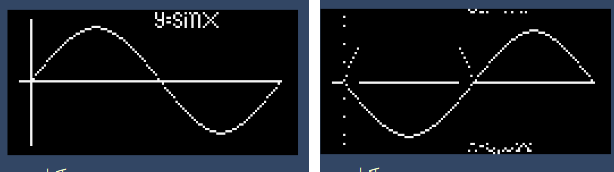
Here are the features in the circuit:
- press '#' to start. It then display the sine curve.
- press '3' to display the 'y=sinx' at the top right side of the image.
- press '*' to toggle the display between inverse and normal.
- press '0' to send A1 cmd.
- press '4' to scroll to the left, press '5' to stop the scroll and press '6' to scroll to the right.
- press '9' to scroll right and vertical and press '7' to scroll left and vertical. (press '5' to stop the scroll )
- press '8' to display offset vertical repeatedly. It appears the display is scrolling downward.
- press '2' to send A3 cmd (vertical scroll area setting) and to activate the scroll. This doesn't look working.
Quote from arcachofo on January 24, 2026, 12:50 pmThank you.
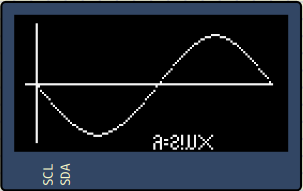
I found the problem with A1 and fixed it:
A3 is not implemented, I will do it, but not sure if I understand it correctly.
It seems to set a fixed area that should not scroll:
29/2A is used to setup vertical scrolling: page start, page end, offset and speed.
Then A3 determines a fixed area that does not scroll within scroll area.
Is this correct?
Thank you.
I found the problem with A1 and fixed it:
A3 is not implemented, I will do it, but not sure if I understand it correctly.
It seems to set a fixed area that should not scroll:
29/2A is used to setup vertical scrolling: page start, page end, offset and speed.
Then A3 determines a fixed area that does not scroll within scroll area.
Is this correct?
Quote from arS on January 25, 2026, 1:37 amHi,
Thanks for looking into these.
As for A1, you've currently implemented a vertical flip. My interpretation of the datasheet is that it should be a left and right flip.
For example, the Y-Axis of the graph should appear in the right hand side and the end of the X-Axis should be displayed on the left hand side, etc.. as per "A1h, X[0]=1b: column address 127 is mapped to SEG0"
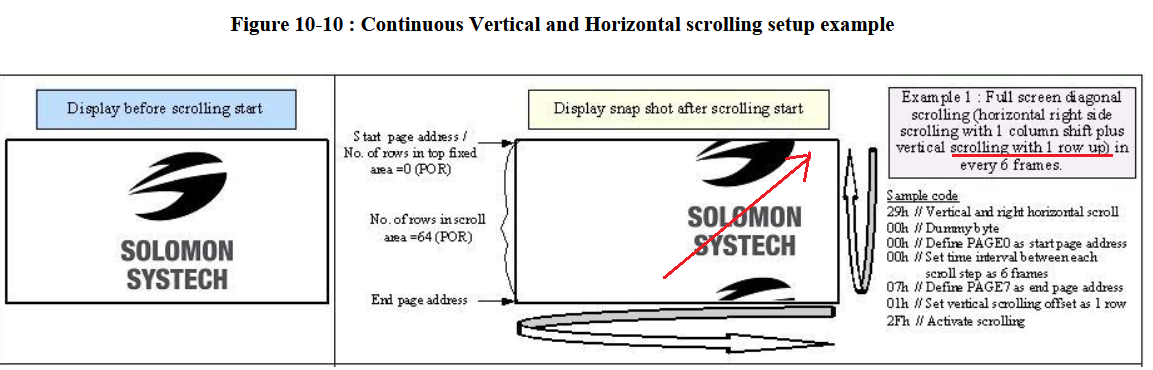
As for 29/2A, your current implementation is fine except that the vertical movement should be upward rather than downward as per p.45 of the datasheet
As for A3, I don't quite understand the implication or the behavior of the scrolling either if the MUX ratio is not set at 111111b.
If the MUX is the reset value, i.e. 111111b, I think then A[5,0] will be the fixed area, i.e. no scrolling, and the B[6,0] is the scrolling area. But the datasheet doesn't say if the vertical scrolling is upward or downward either. So,...
Cheers
Hi,
Thanks for looking into these.
As for A1, you've currently implemented a vertical flip. My interpretation of the datasheet is that it should be a left and right flip.
For example, the Y-Axis of the graph should appear in the right hand side and the end of the X-Axis should be displayed on the left hand side, etc.. as per "A1h, X[0]=1b: column address 127 is mapped to SEG0"
As for 29/2A, your current implementation is fine except that the vertical movement should be upward rather than downward as per p.45 of the datasheet
As for A3, I don't quite understand the implication or the behavior of the scrolling either if the MUX ratio is not set at 111111b.
If the MUX is the reset value, i.e. 111111b, I think then A[5,0] will be the fixed area, i.e. no scrolling, and the B[6,0] is the scrolling area. But the datasheet doesn't say if the vertical scrolling is upward or downward either. So,...
Cheers
Quote from arcachofo on January 25, 2026, 4:39 pmAs for A1, you've currently implemented a vertical flip. My interpretation of the datasheet is that it should be a left and right flip.
Yes, you are right.
As for A3, I don't quite understand the implication or the behavior of the scrolling either if the MUX ratio is not set at 111111b.
If the MUX is the reset value, i.e. 111111b, I think then A[5,0] will be the fixed area, i.e. no scrolling, and the B[6,0] is the scrolling area. But the datasheet doesn't say if the vertical scrolling is upward or downward either. So,...
Well, I think the scrolling is also messed up in the current implementation. A3 is not what I thought.
As I understand now 29/2A defines the RAM area to be used in scroll and A3 defines the screen area to be used in scroll.
In the example shown in the datasheet (image in your previous post) it is not clear because it uses the whole memory and whole screen, so is not really using A3.
So it should work something like this, let me know if this is also your interpretation:
About MUX ratio, it seems to me that this determines the last row to be printed in screen, above that nothing is printed.
So this value limits values used in A3 (table 10-1).
What is not clear is what happens if you actually use values not allowed, value is set to maximum? is ignored?
As for A1, you've currently implemented a vertical flip. My interpretation of the datasheet is that it should be a left and right flip.
Yes, you are right.
As for A3, I don't quite understand the implication or the behavior of the scrolling either if the MUX ratio is not set at 111111b.
If the MUX is the reset value, i.e. 111111b, I think then A[5,0] will be the fixed area, i.e. no scrolling, and the B[6,0] is the scrolling area. But the datasheet doesn't say if the vertical scrolling is upward or downward either. So,...
Well, I think the scrolling is also messed up in the current implementation. A3 is not what I thought.
As I understand now 29/2A defines the RAM area to be used in scroll and A3 defines the screen area to be used in scroll.
In the example shown in the datasheet (image in your previous post) it is not clear because it uses the whole memory and whole screen, so is not really using A3.
So it should work something like this, let me know if this is also your interpretation:

About MUX ratio, it seems to me that this determines the last row to be printed in screen, above that nothing is printed.
So this value limits values used in A3 (table 10-1).
What is not clear is what happens if you actually use values not allowed, value is set to maximum? is ignored?
Quote from arS on January 26, 2026, 2:08 amPerpaps, I would call the cmd 29/2A as diagonal scroll rather than vertical & horizontal to avoid the confusion or mixing with cmd A3.
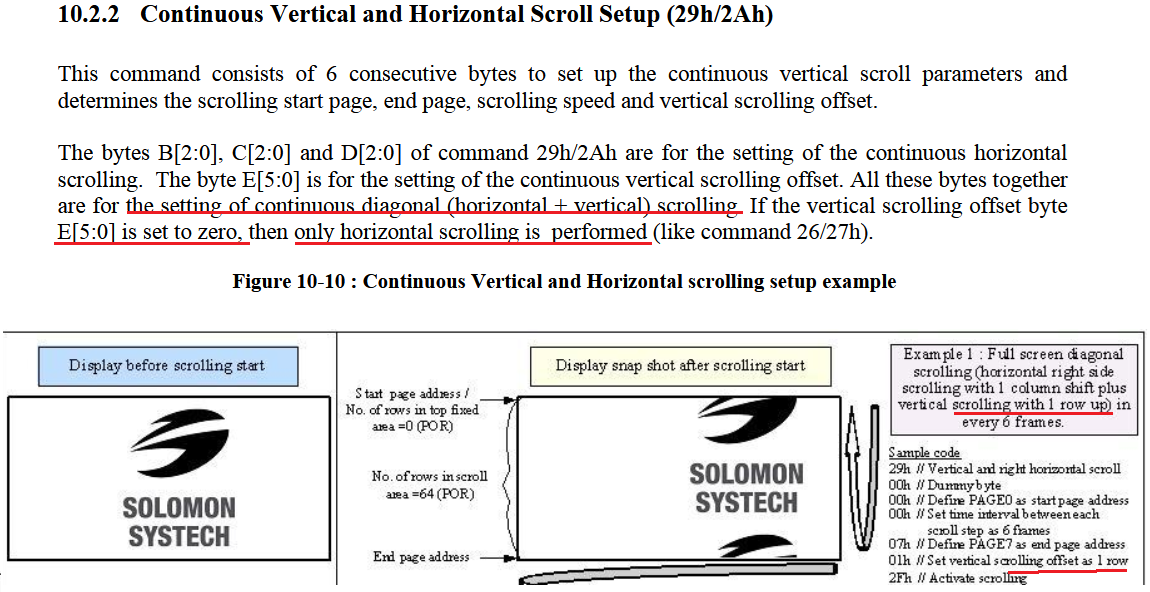
The E[5:0] value of cmd29/2A is to dictate the steepness of the diagonal movement with E[5:0]=1 representing moving 1 row up. It's why it becomes horizontal movement if E[5:0]=0 as per the datasheet. So the example is about cmd 29/2A rather than A3.
I think the only setting in 29/2A has anything to do with A3 is the value of E[5:0] as per note 3a from A3 cmd "Vertical scrolling offset (E[5:0] in 29h/2Ah)<B[6:0]" Obviously, the magnitude of the vertical jump shouldn't be larger than the whole of the intended scrolling area. Also, note 4 "The last row of the scroll area shifts to the first row of the scroll area." suggests the direction of the vertical scroll of A3 cmd is downward.
About the MUX ratio, as per the datasheet table 10-1 in p.38, if the MUX<64, it means bottom parts are not displayed.
The behavior of MUX setting and A3 are sort of explained in note 5 of cmd A3. And it starts to make more sense
"For 64d MUX display
A[5:0] = 0, B[6:0]=64 : whole area scrolls - normal case as no fixed area
A[5:0]= 0, B[6:0] < 64 : top area scrolls - because rows after end of B[6:0] are not used
A[5:0] + B[6:0] < 64 : central area scrolls - because top portion is fixed and rows after end of B[6:0] are not used
A[5:0] + B[6:0] = 64 : bottom area scrolls" - normal case when the top is fixed and the scrolling area matches the end of the MUX display value.I'm hoping someone who has the actual hardware can help verify our understanding so that the community has better simulator for testing purpose.
Perpaps, I would call the cmd 29/2A as diagonal scroll rather than vertical & horizontal to avoid the confusion or mixing with cmd A3.
The E[5:0] value of cmd29/2A is to dictate the steepness of the diagonal movement with E[5:0]=1 representing moving 1 row up. It's why it becomes horizontal movement if E[5:0]=0 as per the datasheet. So the example is about cmd 29/2A rather than A3.
I think the only setting in 29/2A has anything to do with A3 is the value of E[5:0] as per note 3a from A3 cmd "Vertical scrolling offset (E[5:0] in 29h/2Ah)<B[6:0]" Obviously, the magnitude of the vertical jump shouldn't be larger than the whole of the intended scrolling area. Also, note 4 "The last row of the scroll area shifts to the first row of the scroll area." suggests the direction of the vertical scroll of A3 cmd is downward.
About the MUX ratio, as per the datasheet table 10-1 in p.38, if the MUX<64, it means bottom parts are not displayed.
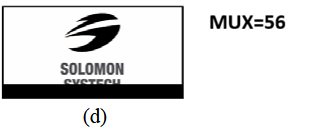
The behavior of MUX setting and A3 are sort of explained in note 5 of cmd A3. And it starts to make more sense
"For 64d MUX display
A[5:0] = 0, B[6:0]=64 : whole area scrolls - normal case as no fixed area
A[5:0]= 0, B[6:0] < 64 : top area scrolls - because rows after end of B[6:0] are not used
A[5:0] + B[6:0] < 64 : central area scrolls - because top portion is fixed and rows after end of B[6:0] are not used
A[5:0] + B[6:0] = 64 : bottom area scrolls" - normal case when the top is fixed and the scrolling area matches the end of the MUX display value.
I'm hoping someone who has the actual hardware can help verify our understanding so that the community has better simulator for testing purpose.
Quote from arcachofo on January 26, 2026, 5:50 pmThis datasheet is a "challenge" to say it politely...
As I understand it, there are only horizontal or diagonal scroll, there is no pure vertical scroll.
In the datasheet command table 29/2A says: "Note (1) No continuous vertical scrolling is available".
Also, libraries, like Adafruit SSD1306 don't have a vertical scroll command.Command A3 is "Set Vertical Scroll Area", so it defines a vertical area in pixels in the screen as I understand it.
The only vertical scrolling is diagonal ones: 29/2A, so A3 should be a configuration for 29/2A, if not what else?.
The description of A3 is:
"This command consists of 3 consecutive bytes to set up the vertical scroll area.
For the continuous vertical scroll function (command 29/2Ah), the number of rows that in vertical scrolling can be set smaller or equal to the MUX ratio."But this does not make much sense to me. I think it means this:
"This command consists of 3 consecutive bytes to set up the vertical scroll area for the continuous vertical scroll function (command 29/2Ah).
The number of rows that in vertical scrolling can be set smaller or equal to the MUX ratio."Command 29/2A defines a start page address and end page address in memory and command A3 defines a vertical area in pixels.
How can this 2 things come together?Just guessing will not solve the mystery, as you say, testing in real hardware is the only good solution.
In any case seems that nobody uses command A3, so by now I will not implement A3.
This datasheet is a "challenge" to say it politely...
As I understand it, there are only horizontal or diagonal scroll, there is no pure vertical scroll.
In the datasheet command table 29/2A says: "Note (1) No continuous vertical scrolling is available".
Also, libraries, like Adafruit SSD1306 don't have a vertical scroll command.
Command A3 is "Set Vertical Scroll Area", so it defines a vertical area in pixels in the screen as I understand it.
The only vertical scrolling is diagonal ones: 29/2A, so A3 should be a configuration for 29/2A, if not what else?.
The description of A3 is:
"This command consists of 3 consecutive bytes to set up the vertical scroll area.
For the continuous vertical scroll function (command 29/2Ah), the number of rows that in vertical scrolling can be set smaller or equal to the MUX ratio."
But this does not make much sense to me. I think it means this:
"This command consists of 3 consecutive bytes to set up the vertical scroll area for the continuous vertical scroll function (command 29/2Ah).
The number of rows that in vertical scrolling can be set smaller or equal to the MUX ratio."
Command 29/2A defines a start page address and end page address in memory and command A3 defines a vertical area in pixels.
How can this 2 things come together?
Just guessing will not solve the mystery, as you say, testing in real hardware is the only good solution.
In any case seems that nobody uses command A3, so by now I will not implement A3.
Quote from arcachofo on January 27, 2026, 12:05 pmI fixed A1 and diagonal scrolling (up instead of down).
Also added undocumented commands 2C/2D for 1 column horizontal scrolling (similar to 26/27).
These commands don't need to send start/ stop scroll, every time you send it scrolls 1 column.A3 is not implemented.
Property "Rotate" is reintroduced to keep compatibility with older circuits.
Here is Windows build if you want to test:
SimulIDE_1.1.0-260127_test.zip
I fixed A1 and diagonal scrolling (up instead of down).
Also added undocumented commands 2C/2D for 1 column horizontal scrolling (similar to 26/27).
These commands don't need to send start/ stop scroll, every time you send it scrolls 1 column.
A3 is not implemented.
Property "Rotate" is reintroduced to keep compatibility with older circuits.
Here is Windows build if you want to test:
SimulIDE_1.1.0-260127_test.zip
Quote from arS on April 11, 2026, 10:13 amHi Arcachofo,
I've got a physical device to test all these. Just want to share with you how they actually displayed in the device from my assemble codes.
Firstly, one strange thing that I've noticed is that the display seems to be upside down though I'm not sure if there was any wrong setting in my codes. I didn't think so given that no such behavior in the simulator. Hope someone can share their thought on this. I've tested on two devices and they have the same outcome.
Test cases
press '#' to start. It then display the sine curve. It looked as expected.
press '3' to display the 'y=sinx' at the top right side of the image. It looked as expected.
press '*' to toggle the display between inverse and normal. It looked as expected.
press '0' to send A1 cmd, i.e. Left/right flip. It behaved as expected though it didn't seem to be able to flip again or flip back to the original position.
press '4' to scroll to the left, press '5' to stop the scroll and press '6' to scroll to the right. It behaved as expected
press '9' to scroll right and vertical and press '7' to scroll left and vertical. (press '5' to stop the scroll ) It scrolled vertically and upward only!
press '8' to display offset vertical repeatedly. It appears the display is scrolling downward. It looked like it scroll upward instead but it might be because the device seems to be upside down as per earlire comment on this post.
press '2' to send A3 cmd (vertical scroll area setting) and to activate the scroll. This didn't work.I've recorded the testing
https://youtube.com/shorts/edX8OgerevA?feature=share
Hi Arcachofo,
I've got a physical device to test all these. Just want to share with you how they actually displayed in the device from my assemble codes.
Firstly, one strange thing that I've noticed is that the display seems to be upside down though I'm not sure if there was any wrong setting in my codes. I didn't think so given that no such behavior in the simulator. Hope someone can share their thought on this. I've tested on two devices and they have the same outcome.
Test cases
press '#' to start. It then display the sine curve. It looked as expected.
press '3' to display the 'y=sinx' at the top right side of the image. It looked as expected.
press '*' to toggle the display between inverse and normal. It looked as expected.
press '0' to send A1 cmd, i.e. Left/right flip. It behaved as expected though it didn't seem to be able to flip again or flip back to the original position.
press '4' to scroll to the left, press '5' to stop the scroll and press '6' to scroll to the right. It behaved as expected
press '9' to scroll right and vertical and press '7' to scroll left and vertical. (press '5' to stop the scroll ) It scrolled vertically and upward only!
press '8' to display offset vertical repeatedly. It appears the display is scrolling downward. It looked like it scroll upward instead but it might be because the device seems to be upside down as per earlire comment on this post.
press '2' to send A3 cmd (vertical scroll area setting) and to activate the scroll. This didn't work.
I've recorded the testing
Quote from arcachofo on April 11, 2026, 1:05 pmHi, thanks for all the testing.
The "upside down" issue is normal, each manufacturer connect things how they like.
Sometimes mirrored or even "shifted": One display was not working in simulide with one library, and after long time investigating I found that in the model targeted by the library X=0 is in the middle of the screen, not at the left so everything was misplaced.Another issue is that many of the displays sold as "SD1306" don't use the original controller but some cheaper "compatible" clone, which might work a bit different.
Maybe that is why diagonal scrolling is not working.Pressing '8' scrolls downward in the simulation but upward in the video.
Maybe we can try to find how command A3 works...
For example sending A3 with some values (not 0 and 63) and then do a diagonal scroll.
Hi, thanks for all the testing.
The "upside down" issue is normal, each manufacturer connect things how they like.
Sometimes mirrored or even "shifted": One display was not working in simulide with one library, and after long time investigating I found that in the model targeted by the library X=0 is in the middle of the screen, not at the left so everything was misplaced.
Another issue is that many of the displays sold as "SD1306" don't use the original controller but some cheaper "compatible" clone, which might work a bit different.
Maybe that is why diagonal scrolling is not working.
Pressing '8' scrolls downward in the simulation but upward in the video.
Maybe we can try to find how command A3 works...
For example sending A3 with some values (not 0 and 63) and then do a diagonal scroll.