
Serial monitor does not work in Arduino Mega

Quote from RDRichardson on April 9, 2026, 10:45 amI can not get known good code to display on the Mega serial monitor, Can anyone help? It all works fine on Nano, but I need more inputs.
I can not get known good code to display on the Mega serial monitor, Can anyone help? It all works fine on Nano, but I need more inputs.

Quote from Mistral on April 10, 2026, 6:18 amHi, I tried it with an 'Export Compiled Binary' sketch from within the Arduino IDE. You can find it at the Sketch menu bar of the IDE.
The path is shown in the Snip here:
This the code used and comes from the Examples > Micro > Arduino > Serial Echo build within the Simulide SR2 software:
C:\Users\sf490\Downloads\SimulIDE_1.1.0-SR2_Win64\examples\Micro\Arduino\arduino_serial_echo\arduino_serial_echo_ino.
I do believe I had to comment out the last line, but anyway, this is the code used:byte byteRead; void setup() { Serial.begin(9600); Serial.write("Serial echo Test\n"); } void loop() { if( Serial.available() ) { byteRead = Serial.read(); Serial.write(byteRead); } } // file:///mnt/software/simulide/simulide_lauchpad/trunk/resources/examples/Micro/Arduino/Keypad/HelloKeypad/HelloKeypad.ino
After compiling that in the Arduino IDE with a Mega as board, I did a Sketch > Export Compiled Binary and right clicked the Mega in the Sim. There you choose 'Load firmware' and browse to the Export Compiled Binary file that is a .hex file.
Hi, I tried it with an 'Export Compiled Binary' sketch from within the Arduino IDE. You can find it at the Sketch menu bar of the IDE.
The path is shown in the Snip here:
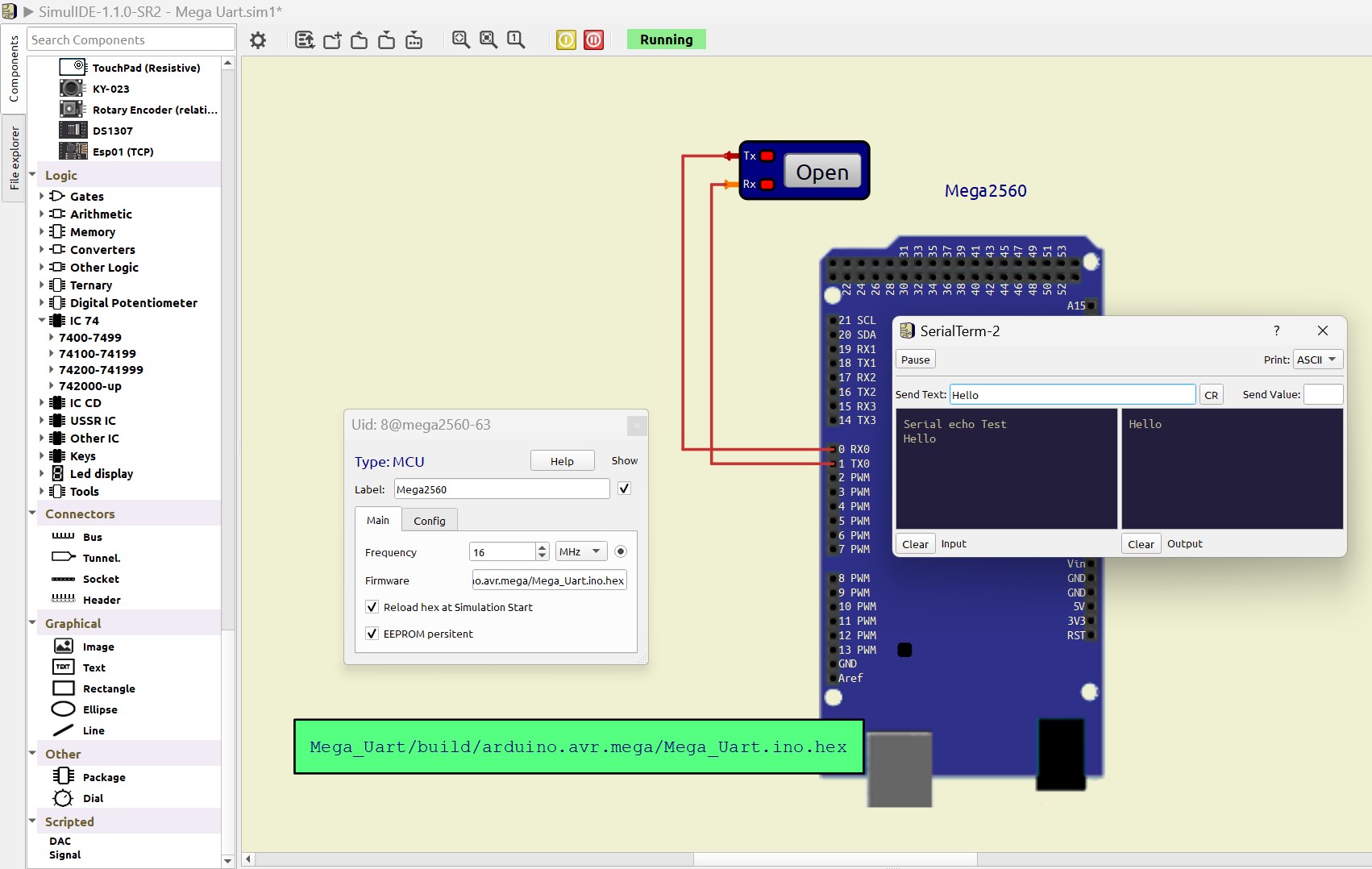
This the code used and comes from the Examples > Micro > Arduino > Serial Echo build within the Simulide SR2 software:
C:\Users\sf490\Downloads\SimulIDE_1.1.0-SR2_Win64\examples\Micro\Arduino\arduino_serial_echo\arduino_serial_echo_ino.
I do believe I had to comment out the last line, but anyway, this is the code used:
byte byteRead;

void setup()
{
    Serial.begin(9600);

    Serial.write("Serial echo Test\n");
}

void loop()
{
    if( Serial.available() )
    {
        byteRead = Serial.read();

        Serial.write(byteRead);
    }
}
// file:///mnt/software/simulide/simulide_lauchpad/trunk/resources/examples/Micro/Arduino/Keypad/HelloKeypad/HelloKeypad.ino
After compiling that in the Arduino IDE with a Mega as board, I did a Sketch > Export Compiled Binary and right clicked the Mega in the Sim. There you choose 'Load firmware' and browse to the Export Compiled Binary file that is a .hex file.