
Connecting SimulIDE to Arduino IDE

Quote from Ethan Khoo on March 19, 2024, 11:37 amHi, how do I connect my SimulIDE and Arduino IDE, I have tried a couple of times and it still doesn't work. I have tried solving the problem:
- I have deleted it and redownloaded ensuring the tool path is correct
- set my complier setting for tool path and include path to the location of the file
I would really appreciate it if someone help me solve this problem as it seem to only occur for me.
Hi, how do I connect my SimulIDE and Arduino IDE, I have tried a couple of times and it still doesn't work. I have tried solving the problem:
- I have deleted it and redownloaded ensuring the tool path is correct
- set my complier setting for tool path and include path to the location of the file
I would really appreciate it if someone help me solve this problem as it seem to only occur for me.

Quote from arcachofo on March 19, 2024, 7:06 pmHi.
It would be good to konw some information to try figure out what is the problem, for example:
- Which version of Simulide are you using (and which OS)?
- Which Arduino IDE version?
- What is exactly the problem? does not detect the Arduino IDE? does not compile?
- If there is some error message at the bottom panel, can you copy/paste here?Also the "Include path" should be empty in most cases.
Hi.
It would be good to konw some information to try figure out what is the problem, for example:
- Which version of Simulide are you using (and which OS)?
- Which Arduino IDE version?
- What is exactly the problem? does not detect the Arduino IDE? does not compile?
- If there is some error message at the bottom panel, can you copy/paste here?
Also the "Include path" should be empty in most cases.
Quote from Ethan Khoo on March 20, 2024, 10:48 amHi, thanks for your response, here is my situation:
- The version of Simulide I'm using is: SimulIDE_1.0.0-SR2_Win64
- The version of Arduino IDE is v1.8.19
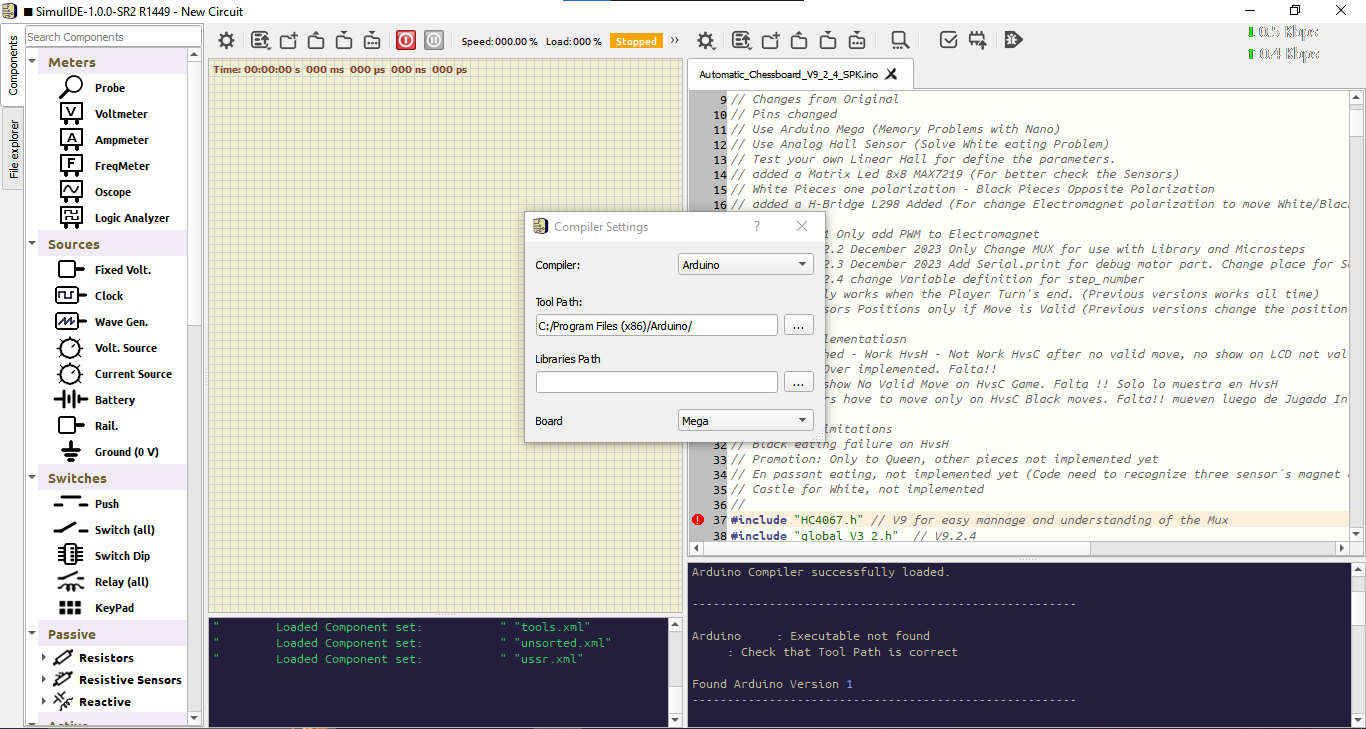
- The problem is when I press compile it says:: Executable not found
: Check that Tool Path is correctWARNING: Compilation Not Done
There isn't a "include path" for my Simulide, instead it says "Libraries Path"
Hi, thanks for your response, here is my situation:
- The version of Simulide I'm using is: SimulIDE_1.0.0-SR2_Win64
- The version of Arduino IDE is v1.8.19
- The problem is when I press compile it says:
: Executable not found
: Check that Tool Path is correct
WARNING: Compilation Not Done
There isn't a "include path" for my Simulide, instead it says "Libraries Path"
Quote from arcachofo on March 20, 2024, 8:57 pmThanks for the information.
Didn't try that exact Arduino version, but I think it shouldn't be any problem.
- Leave "Libraries Path" empty.
- If Arduino IDE folder is in the desktop, "Tool Path" should be something like this: C:/Users/me/Desktop/arduino-1.8.19_win/
You can check that just inside folder "arduino-1.8.19_win" (or similar) there is a program named: "arduino-builder"
Thanks for the information.
Didn't try that exact Arduino version, but I think it shouldn't be any problem.
- Leave "Libraries Path" empty.
- If Arduino IDE folder is in the desktop, "Tool Path" should be something like this: C:/Users/me/Desktop/arduino-1.8.19_win/
You can check that just inside folder "arduino-1.8.19_win" (or similar) there is a program named: "arduino-builder"
Quote from Ethan Khoo on March 21, 2024, 1:20 amHi, I'm told to use that version of Arduino IDE as it is the only version that can pair with simulide.
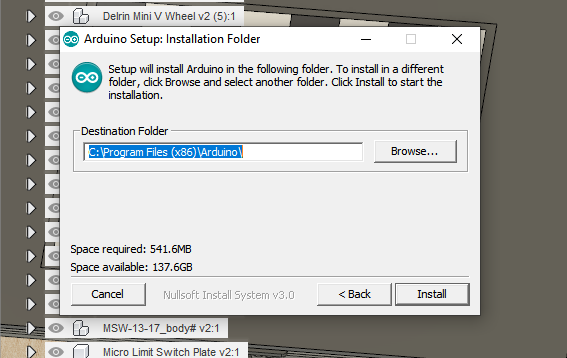
- The Arduino IDE in my desktop is a shortcut from: C:\Program Files (x86)\Arduino
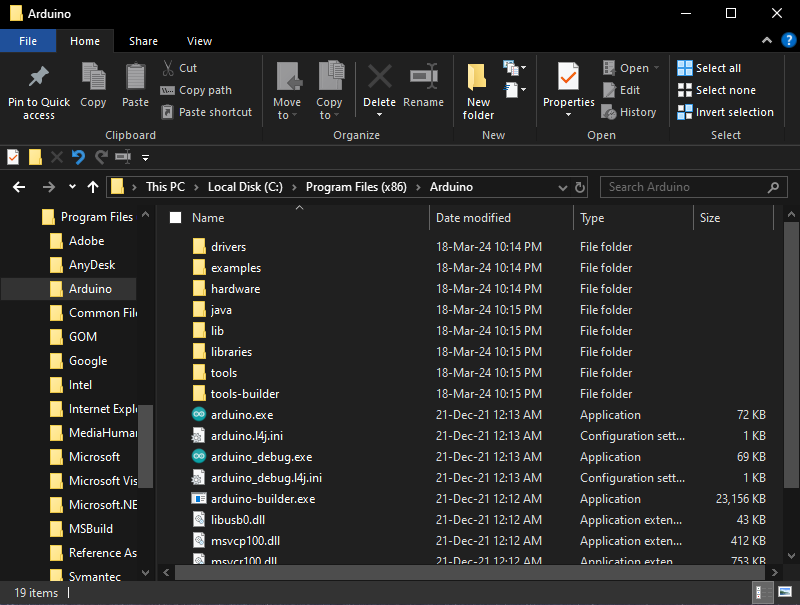
- There is a file named: "tool-builder", I'm not sure if it is the same as the program: "arduino-builder"
Hi, I'm told to use that version of Arduino IDE as it is the only version that can pair with simulide.
- The Arduino IDE in my desktop is a shortcut from: C:\Program Files (x86)\Arduino
- There is a file named: "tool-builder", I'm not sure if it is the same as the program: "arduino-builder"

Quote from arcachofo on March 21, 2024, 2:37 amHi, I'm told to use that version of Arduino IDE as it is the only version that can pair with simulide.
SimulIDE_1.0.0-SR2 should work with Arduino IDE 2 as well (unless they have changed something again in last versions).
But Arduino 1.8.x works well.I see arduino-builder.exe in your Arduino folder, so that is Ok.
If you open an .ino file in the Editor and open "Compiler Setings", it should look like this:
With those settings it should work and the message at the bottom panel shold be something like this:
-------------------------------------------------------
File: C:/Users/me/Desktop/AlarmClock/AlarmClock.ino
Found Arduino Version 1
Arduino Compiler successfully loaded.
-------------------------------------------------------
Hi, I'm told to use that version of Arduino IDE as it is the only version that can pair with simulide.
SimulIDE_1.0.0-SR2 should work with Arduino IDE 2 as well (unless they have changed something again in last versions).
But Arduino 1.8.x works well.
I see arduino-builder.exe in your Arduino folder, so that is Ok.
If you open an .ino file in the Editor and open "Compiler Setings", it should look like this:
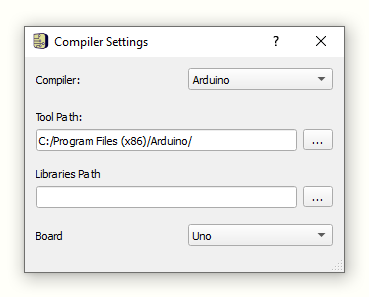
With those settings it should work and the message at the bottom panel shold be something like this:
-------------------------------------------------------
File: C:/Users/me/Desktop/AlarmClock/AlarmClock.ino
Found Arduino Version 1
Arduino Compiler successfully loaded.
-------------------------------------------------------
Quote from Ethan Khoo on March 21, 2024, 3:07 amHi, I managed to pair my Simulide with Arduino IDE. Thanks for your help!
Hi, I managed to pair my Simulide with Arduino IDE. Thanks for your help!

Quote from fredcwGO_BR on September 16, 2026, 10:51 amHowdy,
I'm having trouble to compile on the SimulIDE 2.0.0-260915 , there is no "tools-builder" anywhere, and i can't seem to find any related pointer to it.,
Please advice;
Found Arduino Version 1

Board: Mega

-------------------------------------------------------

Executing:

"/usr/share/arduino/arduino-builder" -compile -hardware "/usr/share/arduino/hardware" -hardware "/home/fred/Arduino/hardware" -tools "/usr/share/arduino/tools-builder" -tools "/usr/share/arduino/hardware/tools/avr" -built-in-libraries "/usr/share/arduino/libraries" -libraries "/home/fred/Arduino/libraries" -fqbn=arduino:avr:megaADK -build-path "/home/fred/.local/share/simulide/codeeditor/buildIno/build" -build-cache "/home/fred/.local/share/simulide/codeeditor/buildIno/cache" "/home/fred/Arduino/MegaMemTest/MegaMemtest0/MegaMemtest0.ino"

Build folder: /home/fred/.local/share/simulide/codeeditor/buildIno

SketchBook: /home/fred/Arduino

Arduino Board "arduino:avr:megaADK"

open /usr/share/arduino/tools-builder: no such file or directory

root@alpha:/usr/share/arduino# find /usr -iname tools-builder
root@alpha:/usr/share/arduino# find /opt -iname tools-builder
root@alpha:/usr/share/arduino# find /home -iname tools-builder

root@alpha:/usr/share/arduino#
root@alpha:/usr/share/arduino# apt-cache policy arduino* arduino: Instalado: 2:1.8.19+dfsg1-3 Candidato: 2:1.8.19+dfsg1-3 Tabela de versão: *** 2:1.8.19+dfsg1-3 500 500 http://127.0.0.1/repo/debian trixie/main amd64 Packages 100 /var/lib/dpkg/status arduino-builder: Instalado: 1.3.25-5+b2 Candidato: 1.3.25-5+b2 Tabela de versão: *** 1.3.25-5+b2 500 500 http://127.0.0.1/repo/debian trixie/main amd64 Packages 100 /var/lib/dpkg/status arduino-ctags: Instalado: 5.8-arduino11-3 Candidato: 5.8-arduino11-3 Tabela de versão: *** 5.8-arduino11-3 500 500 http://127.0.0.1/repo/debian trixie/main amd64 Packages 100 /var/lib/dpkg/status
Installed packages ..

root@alpha:/usr/share/arduino# aptitude search avr | grep ^i
i  arduino-core-avr - Arduino Core for AVR microcontroller
i  avr-libc - Biblioteca C padrão para desenvolvimento com Atmel AVR
i  avra - assembler for Atmel AVR microcontrollers
i  avrdude - software para programar microcontroladores Atmel AVR
i  avrp - programador para microcontroladores Atmel AVR
i  binutils-avr - utilitários binários que dão suporte aos alvos AVR da Atmel
i  gcc-avr - compilador GNU C (compilador cruzado para avr)
i  gdb-avr - GNU Debugger for avr
i  libsimavr-dev - AVR simulator development library
i  libsimavr-examples - AVR simulator development examples
i  libsimavr2 - AVR simulator shared library
i  libsimavrparts1 - AVR simulator additional peripherals shared library
i  simavr - lean and mean AVR simulator
i  simulavr - Simulador Atmel AVR
Just found out that leaving "--tools=tools-builder" out, .., it does compile,
as a work around,
mkdir /usr/share/arduino/tools-builder
allowed compilation to resume,
Howdy,
I'm having trouble to compile on the SimulIDE 2.0.0-260915 , there is no "tools-builder" anywhere, and i can't seem to find any related pointer to it.,
Please advice;
Found Arduino Version 1

Board: Mega

-------------------------------------------------------

Executing:

"/usr/share/arduino/arduino-builder" -compile -hardware "/usr/share/arduino/hardware" -hardware "/home/fred/Arduino/hardware" -tools "/usr/share/arduino/tools-builder" -tools "/usr/share/arduino/hardware/tools/avr" -built-in-libraries "/usr/share/arduino/libraries" -libraries "/home/fred/Arduino/libraries" -fqbn=arduino:avr:megaADK -build-path "/home/fred/.local/share/simulide/codeeditor/buildIno/build" -build-cache "/home/fred/.local/share/simulide/codeeditor/buildIno/cache" "/home/fred/Arduino/MegaMemTest/MegaMemtest0/MegaMemtest0.ino"

Build folder: /home/fred/.local/share/simulide/codeeditor/buildIno

SketchBook: /home/fred/Arduino

Arduino Board "arduino:avr:megaADK"

open /usr/share/arduino/tools-builder: no such file or directory

root@alpha:/usr/share/arduino# find /usr -iname tools-builder
root@alpha:/usr/share/arduino# find /opt -iname tools-builder
root@alpha:/usr/share/arduino# find /home -iname tools-builder

root@alpha:/usr/share/arduino#
root@alpha:/usr/share/arduino# apt-cache policy arduino*
arduino:
Instalado: 2:1.8.19+dfsg1-3
Candidato: 2:1.8.19+dfsg1-3
Tabela de versão:
*** 2:1.8.19+dfsg1-3 500
500 http://127.0.0.1/repo/debian trixie/main amd64 Packages
100 /var/lib/dpkg/status
arduino-builder:
Instalado: 1.3.25-5+b2
Candidato: 1.3.25-5+b2
Tabela de versão:
*** 1.3.25-5+b2 500
500 http://127.0.0.1/repo/debian trixie/main amd64 Packages
100 /var/lib/dpkg/status
arduino-ctags:
Instalado: 5.8-arduino11-3
Candidato: 5.8-arduino11-3
Tabela de versão:
*** 5.8-arduino11-3 500
500 http://127.0.0.1/repo/debian trixie/main amd64 Packages
100 /var/lib/dpkg/status
Installed packages ..

root@alpha:/usr/share/arduino# aptitude search avr | grep ^i
i  arduino-core-avr - Arduino Core for AVR microcontroller
i  avr-libc - Biblioteca C padrão para desenvolvimento com Atmel AVR
i  avra - assembler for Atmel AVR microcontrollers
i  avrdude - software para programar microcontroladores Atmel AVR
i  avrp - programador para microcontroladores Atmel AVR
i  binutils-avr - utilitários binários que dão suporte aos alvos AVR da Atmel
i  gcc-avr - compilador GNU C (compilador cruzado para avr)
i  gdb-avr - GNU Debugger for avr
i  libsimavr-dev - AVR simulator development library
i  libsimavr-examples - AVR simulator development examples
i  libsimavr2 - AVR simulator shared library
i  libsimavrparts1 - AVR simulator additional peripherals shared library
i  simavr - lean and mean AVR simulator
i  simulavr - Simulador Atmel AVR
Just found out that leaving "--tools=tools-builder" out, .., it does compile,
as a work around,
mkdir /usr/share/arduino/tools-builder
allowed compilation to resume,
Quote from arcachofo on September 16, 2026, 11:53 amSimulIDE works with Arduino IDE downloaded from official page.
Linux packages seem to be incomplete, at least Debian ones.Your example compiles and debugs ok in my system.
SimulIDE works with Arduino IDE downloaded from official page.
Linux packages seem to be incomplete, at least Debian ones.
Your example compiles and debugs ok in my system.