
Support This Project
This project is made possible by people like you. If you find it useful and would like to help keep it growing, consider making a donation. Every contribution, no matter the size, helps cover costs, fund new features, and keep this project available for everyone.
Thank you for your support — it truly makes a difference.
SimuSerial
Serial Port Terminal for communicating with serial devices.
Select the serial port from the Port list (or type it manually) and choose the Baud rate.
Click Connect to open the connection. Once connected, the button changes to Disconnect.
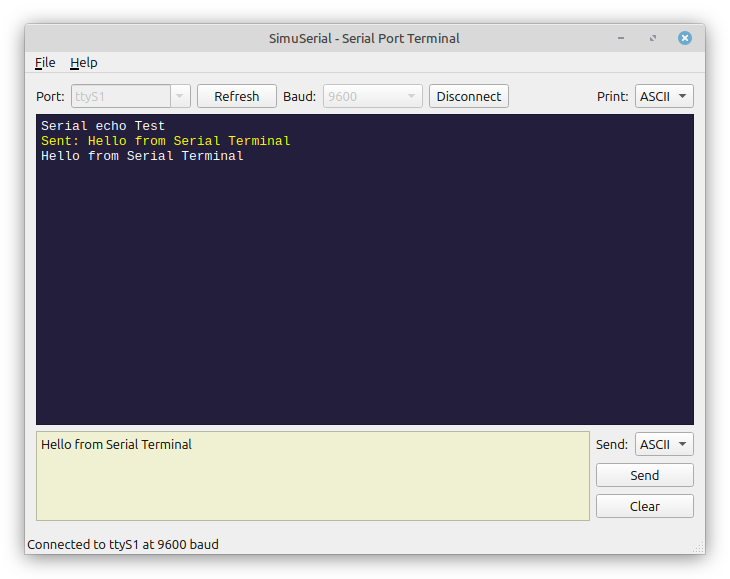
Connection Controls:
- Port: Dropdown list of available serial ports. You can also type a port name manually.
- Refresh: Scan for available ports and update the list.
- Baud: Select baud rate from 9600, 19200, 38400, 57600 or 115200 (default).
- Connect/Disconnect: Toggle serial connection. Connected state disables Port and Baud controls.
The status bar at the bottom shows connection status and active port/baud info.
Print Format:
Use the Print dropdown to control how received data is displayed:
- ASCII: Shows printable characters; non-printable bytes shown as
., newlines/carriage returns/tabs preserved. - HEX: Each byte as 2-digit uppercase hexadecimal, space-separated.
- DEC: Each byte as 3-digit decimal, space-separated.
- OCT: Each byte as 3-digit octal, space-separated.
- BIN: Each byte as 8-digit binary, space-separated.
Received data appears in white, sent data in yellow.
Sending Data:
Type your data in the bottom input area, select the send format, and click Send.
- ASCII: Sends the text followed by
\r\n. - HEX / DEC / OCT / BIN: Enter space-separated values. Each value is converted to a byte and sent.
Example (HEX mode): FF 01 A0 sends 3 bytes: 0xFF, 0x01, 0xA0.
- Clear clears the input area.
- Send File (File menu) loads a file’s content into the input area.
File Menu:
- Clear: Clear the received data display.
- Save Log: Save all received data to a text file.
- Send File: Load a file into the input area for sending.
- Exit: Close the application.