
Learning to create scripted component

Quote from Tonigau on October 7, 2026, 10:13 pmI am making a component to simulate state behavior & Vout of the IR2104 gate driver(half bridge).
It has logic inputs IN & SD
Supply inputs Vcc & Vb Typically 15V.
Outputs HL & HO I set to 1R impedance for now.I have the logic states & supply voltage applied to outputs.
HL volt output is referenced to GND.Issue 1.
I get a 'NonLinear Not Converging' when I connect to HL to MOSFET gate-----------------------------
What I need to do next is to enable pin to pin volt reference, currently pin volts are GND referenced.
Pin Vs is a floating reference, HO & Vb volts should reference to this pin.Q1. How do I set a pin volt to reference another(floaing) pin.
Q2. How can I create a delay from IN_pin volt change (or logic variable state) to set output on.
I need to create dead-time ~500ns before turn on either HL_pin or HO_Pin.Thanks
I am making a component to simulate state behavior & Vout of the IR2104 gate driver(half bridge).
It has logic inputs IN & SD
Supply inputs Vcc & Vb Typically 15V.
Outputs HL & HO I set to 1R impedance for now.
I have the logic states & supply voltage applied to outputs.
HL volt output is referenced to GND.
Issue 1.
I get a 'NonLinear Not Converging' when I connect to HL to MOSFET gate
-----------------------------
What I need to do next is to enable pin to pin volt reference, currently pin volts are GND referenced.
Pin Vs is a floating reference, HO & Vb volts should reference to this pin.
Q1. How do I set a pin volt to reference another(floaing) pin.
Q2. How can I create a delay from IN_pin volt change (or logic variable state) to set output on.
I need to create dead-time ~500ns before turn on either HL_pin or HO_Pin.
Thanks
Uploaded files:
Quote from arcachofo on October 8, 2026, 8:12 amQ1. You cant.
Q2. Use: void scheduleState( bool state, uint64 time ) , for example: HL_pin.scheduleState( true, 500*1000 );
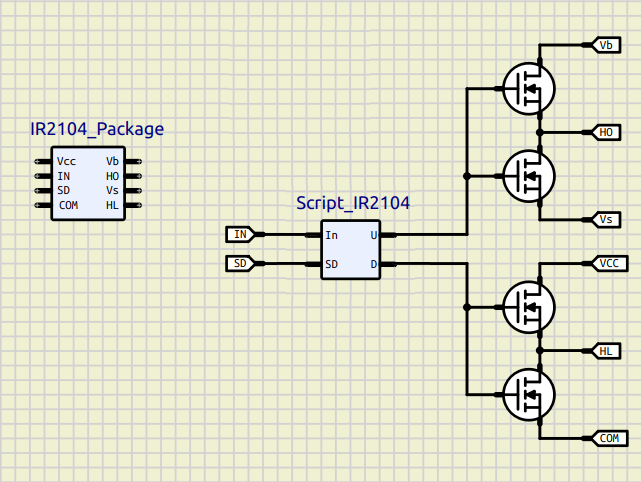
I think the only way to create a component like this is with a Script for logic and Mosfets for output stage, then put all into a Subcircuit, something like this:
Q1. You cant.
Q2. Use: void scheduleState( bool state, uint64 time ) , for example: HL_pin.scheduleState( true, 500*1000 );
I think the only way to create a component like this is with a Script for logic and Mosfets for output stage, then put all into a Subcircuit, something like this:
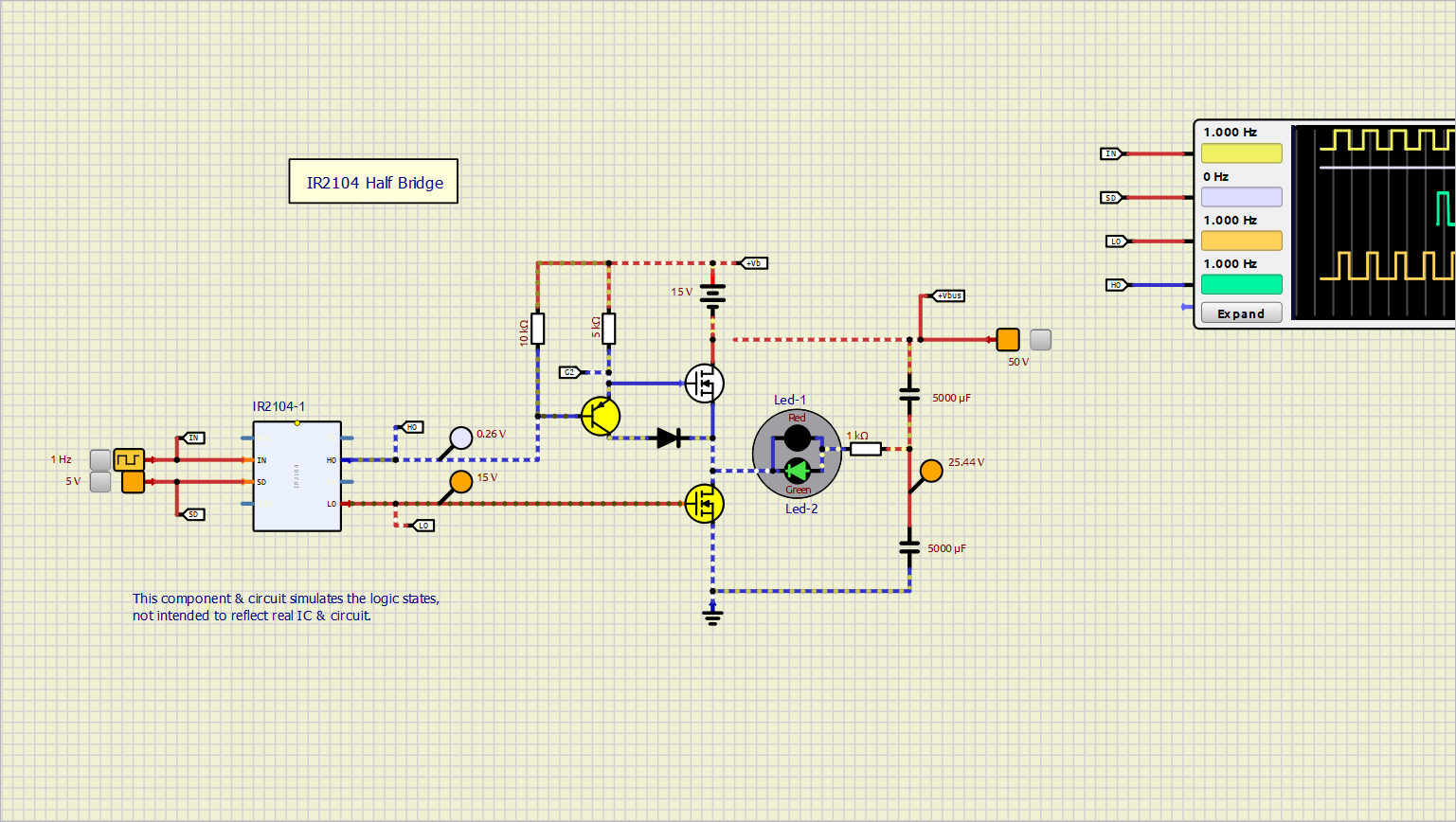
Quote from Tonigau on October 19, 2026, 12:53 amI have component, script & sim working as needed now.
The component just models logic, HO output is OpenDrain.The script is working correctly, but I would like to clarify some finer detail,
The setters appear to be called in order as per property dialog.
My property setter procedure setDeadtime(uint val) is called at file load, because Scale_string is still default "ns" the value of DeadtimeVal_ps is incorrectly set to *1000(ns) instead of *1000000000(ms) as Setter proc. setScale(string val) is called after.
However when simulation is started both DeadtimeVal_ps & Scale_string are correct but setDeadtime(uint val) did not appear to be called (no debug print).
Something 'under the hood' is applying some magic. ( setters are called again at sim start with print output disabled ?)This is not an issue, Just curious
I have component, script & sim working as needed now.
The component just models logic, HO output is OpenDrain.
The script is working correctly, but I would like to clarify some finer detail,
The setters appear to be called in order as per property dialog.
My property setter procedure setDeadtime(uint val) is called at file load, because Scale_string is still default "ns" the value of DeadtimeVal_ps is incorrectly set to *1000(ns) instead of *1000000000(ms) as Setter proc. setScale(string val) is called after.
However when simulation is started both DeadtimeVal_ps & Scale_string are correct but setDeadtime(uint val) did not appear to be called (no debug print).
Something 'under the hood' is applying some magic. ( setters are called again at sim start with print output disabled ?)
This is not an issue, Just curious
Quote from arcachofo on October 19, 2026, 9:21 amSorry but I don't see the "magic"
My property setter procedure setDeadtime(uint val) is called at file load, because Scale_string is still default "ns" the value of DeadtimeVal_ps is incorrectly set to *1000(ns) instead of *1000000000(ms) as Setter proc. setScale(string val) is called after.
However when simulation is started both DeadtimeVal_ps & Scale_string are correct but setDeadtime(uint val) did not appear to be called (no debug print).
Something 'under the hood' is applying some magic. ( setters are called again at sim start with print output disabled ?)At file load:
1- setDeadtime(uint val) is called -> DeadtimeVal_ps is incorrectly set to *1000(ns)
2- setScale(string val) is called -> DeadtimeVal_ps is is correctly set to *1000000000(ms)So now DeadtimeVal_ps holds the correct value.
Then when simulation starts values are ok.Another option is to let the script handle units:
In .mcu file:<propertygroup name="Gate Driver"> <property name="Deadtime" type="double" unit="ns"/> </propertygroup>And you will get something like this:
There are some minor changes in the script code but you save a few functions (example attached).
Sorry but I don't see the "magic"
My property setter procedure setDeadtime(uint val) is called at file load, because Scale_string is still default "ns" the value of DeadtimeVal_ps is incorrectly set to *1000(ns) instead of *1000000000(ms) as Setter proc. setScale(string val) is called after.
However when simulation is started both DeadtimeVal_ps & Scale_string are correct but setDeadtime(uint val) did not appear to be called (no debug print).
Something 'under the hood' is applying some magic. ( setters are called again at sim start with print output disabled ?)
At file load:
1- setDeadtime(uint val) is called -> DeadtimeVal_ps is incorrectly set to *1000(ns)
2- setScale(string val) is called -> DeadtimeVal_ps is is correctly set to *1000000000(ms)
So now DeadtimeVal_ps holds the correct value.
Then when simulation starts values are ok.
Another option is to let the script handle units:
In .mcu file:
     <propertygroup name="Gate Driver">
       <property name="Deadtime" type="double" unit="ns"/>
    </propertygroup>
And you will get something like this:

There are some minor changes in the script code but you save a few functions (example attached).
Uploaded files:
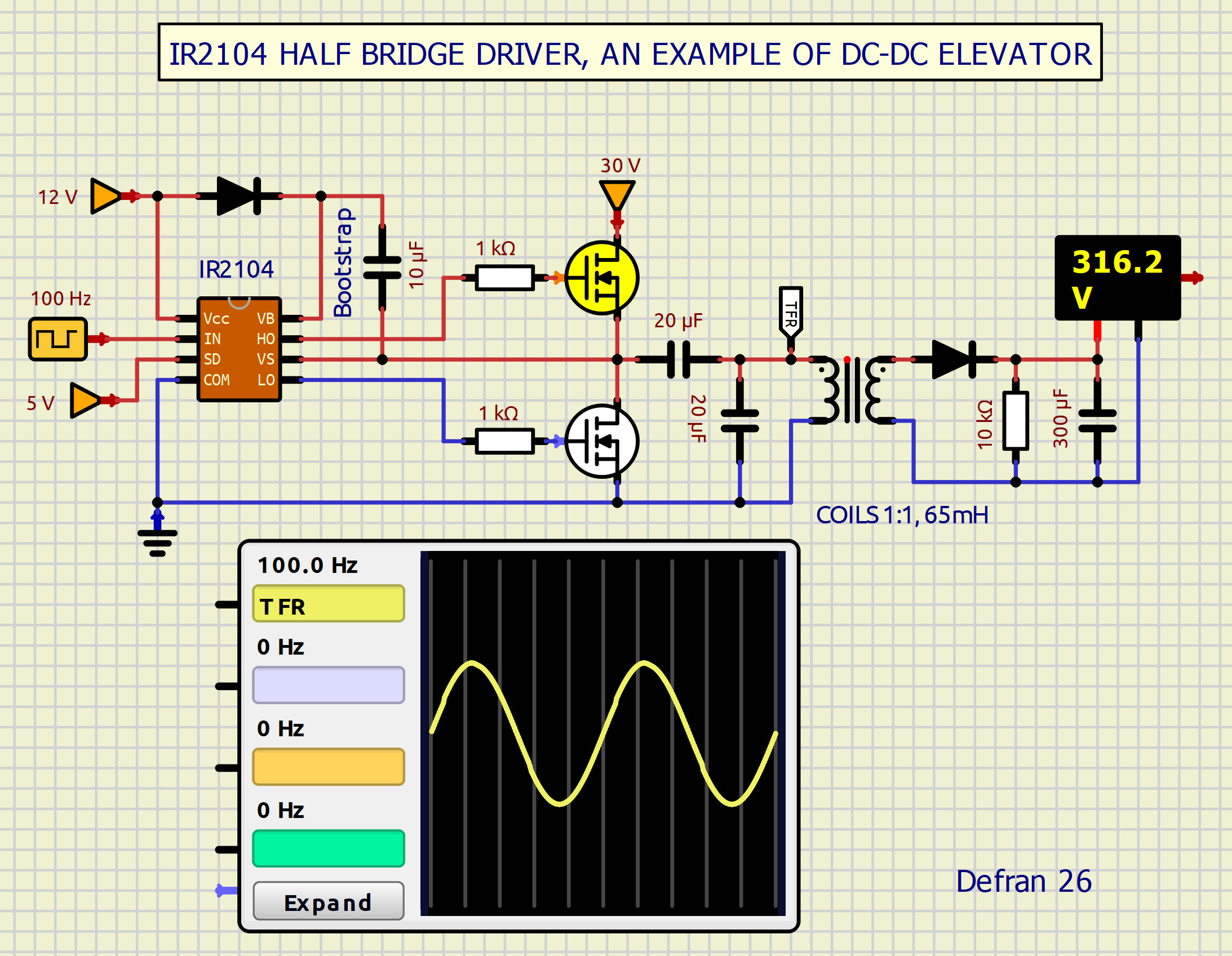
Quote from Defran on October 19, 2026, 8:52 pmExcited by the idea. I started tinkering and came up with this variant of subcircuit...
Excited by the idea. I started tinkering and came up with this variant of subcircuit...
Quote from Tonigau on October 19, 2026, 9:58 pmThe 'magic' was just me having a lapse of memory & looking at my own code.
I wondered how the scale selector was created, (unit="ns") hence my method with Scale_string.
Thanks for the updated setDeadtime( double val ) function.
The 'magic' was just me having a lapse of memory & looking at my own code.
I wondered how the scale selector was created, (unit="ns") hence my method with Scale_string.
Thanks for the updated setDeadtime( double val ) function.